August 10th, 2026
New Beta Feature
Connecting your broker to SharkSignals is getting easier and more flexible. In this update, we walk through how to link your brokerage accounts—and take a look at a new Beta Feature that unlocks support for Tradovate.

Here is the breakdown of how to enable and configure the feature:
What’s New: Tradovate Integration (Beta)
We are rolling out support for Tradovate as an optional Beta Feature! This allows you to route incoming trading signals directly to your Tradovate accounts (both Live and Demo) using native OAuth authentication.
How to Enable the Beta Feature
Activate Beta Features in Settings:
By default, the Tradovate broker option and the Add Broker button may appear greyed out or disabled.
To enable it, navigate to your Settings / Profile area in SharkSignals and toggle on Enable Beta Features.
Once enabled, the Tradovate connection option will unlock on the Brokers page.
Add Your Tradovate Connection:
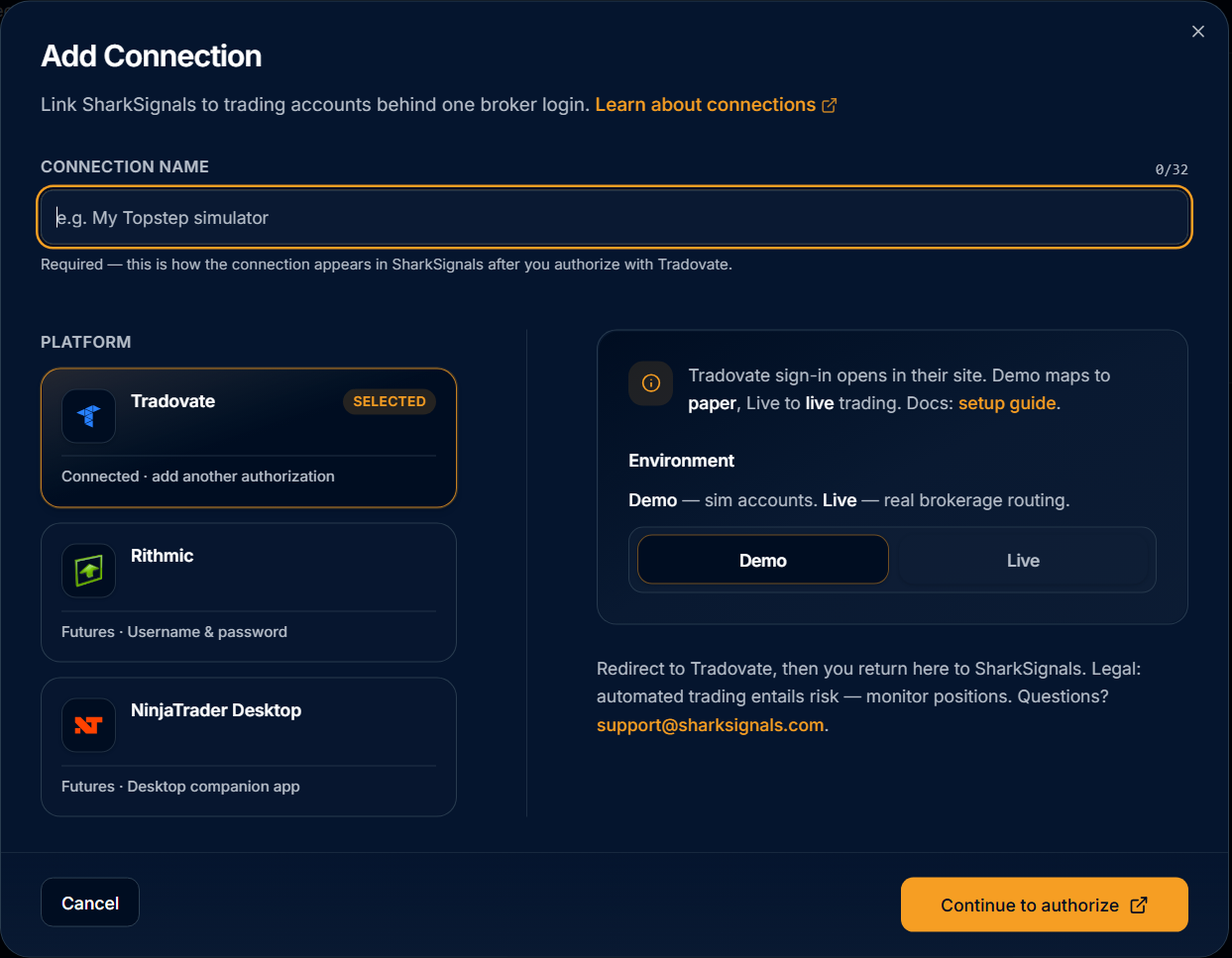
Go to the Brokers tab on the left navigation bar and click + Add Broker.
Select Tradovate under the list of supported platforms.
Enter a custom connection name (e.g., "My Trader Account").
Select your target environment (Demo or Live).
Authenticate & Connect:
Click Continue to Authorize.
You will be redirected to Tradovate’s secure login portal (or sign in via Google / Apple).
Grant SharkSignals permission to read profile, account, and execution data.
Once authorized, you’ll be routed back to SharkSignals with a connected status message!
Other Supported Broker Connections
In addition to Tradovate, SharkSignals continues to support multiple execution and broker connections:
Rithmic: Connect directly using your Rithmic credentials (including Rithmic Paper Trading or Rithmic Test environments).
NinjaTrader Desktop: Connect via the downloadable SharkSignals Desktop Companion App to automatically sync NinjaTrader accounts and trades.
Try It Out
If you'd like to help test the Tradovate integration before its general release, enable Beta Features in your account today and let us know your feedback!